
All work
App Gen
Natural-language application creation inside eiq360, describe a business process in plain words, get a governed, deployable enterprise application.


Duration
Around 2- 3 months
Role
Senior Designer — Product strategy, UX definition, interaction design, visual direction and design QA through implementation.
The Problem
In most enterprises, the person who understands a business process and the person who can build it are never the same person.
A procurement lead can describe an approval workflow in a sentence. Turning that into working software means a business analyst writing a requirements document, a backlog, and weeks of development — describe the process, write the BRD, hand it to engineering, build the forms, rules and roles, then wait. Meaning leaks at every handoff.
The bottleneck was never the tooling. It was the distance between knowledge and execution.
THE CHALLENGE
In an enterprise, the person who understands a business process and the person who can build it are never the same person.
HOW IT WORKS WITHOUT APP GEN
Meaning leaks at every handoff, and the person who understood the process is no longer in the room by the time it is built.
Describe
a sentence from the process owner
Document
an analyst writes the BRD
Groom
product and engineering size it
Build
forms, rules, roles, validation
Wait
weeks, then review what came back
HOW IT WORKS WITH APP GEN
EvoluteIQ's earlier low-code product ran this same process, but every step needed a different person to configure it. App Gen now handles most of the chain on its own, leaving one person to describe the process and check what comes back.
Describe
the same sentence from the process owner
Understand
the AI reads the process and its intent
Generate
the application, screens and data model
Define
the workflow, rules and roles
Scale with no ceiling
One description can expand into as many business processes as the operation needs — hundreds of nodes, forms, rules, roles and data models, all of which have to stay legible on one canvas.
Approval that predates the AI
Enterprise sign-off already runs on audit trails, roles and review. Generated software has to be inspectable, correctable and reversible before anyone will put their name on it.
THE PRODUCT
One path from a described process to a running application.
Describe it in plain words. Everything after that is review, correction and governed release — no black box, no handoff.
Describe
the process in plain words
Clarify
two skippable questions
Review
a readable document
Generate
processes and nodes
Refine
edit in plain language
Validate
errors versus warnings
Deploy
versioned and reversible
1
DESCRIPTION IN
Any
NUMBER OF PROCESSES OUT
100+
NODES, FORMS, RULES, DATA MODELS
4
STAGES, FROM INTENT TO LIVE
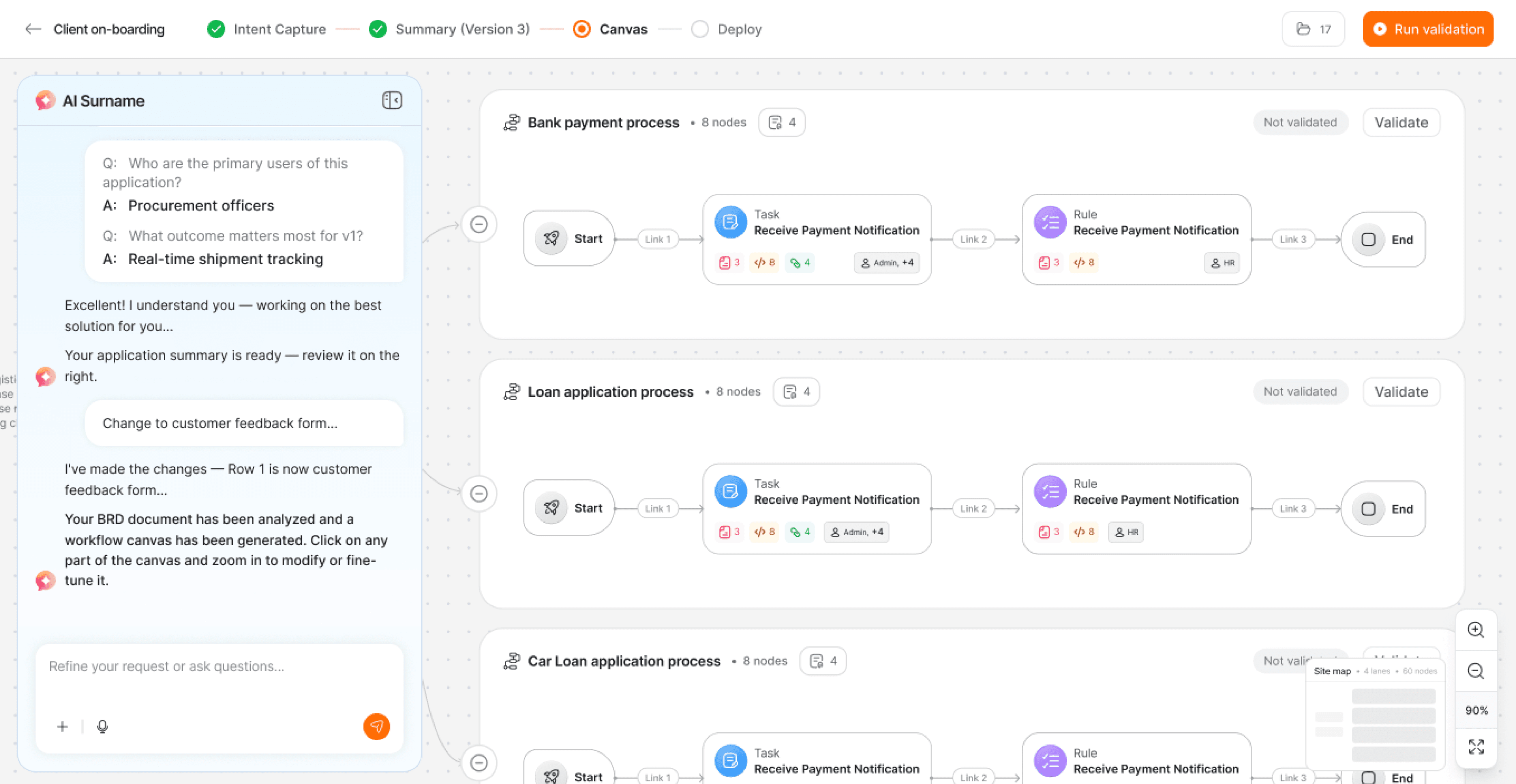
Generated canvas — one description expands into as many business processes as the operation needs, each grouped into its own collapsible lane so scale stays legible however far it grows.

Clarify
Two skippable questions resolve ambiguity while generation already runs behind them.

Review
The first thing the AI returns is a readable business document, not a diagram.

Refine
Editing anchors to a selected field, so users describe the change — not its location.
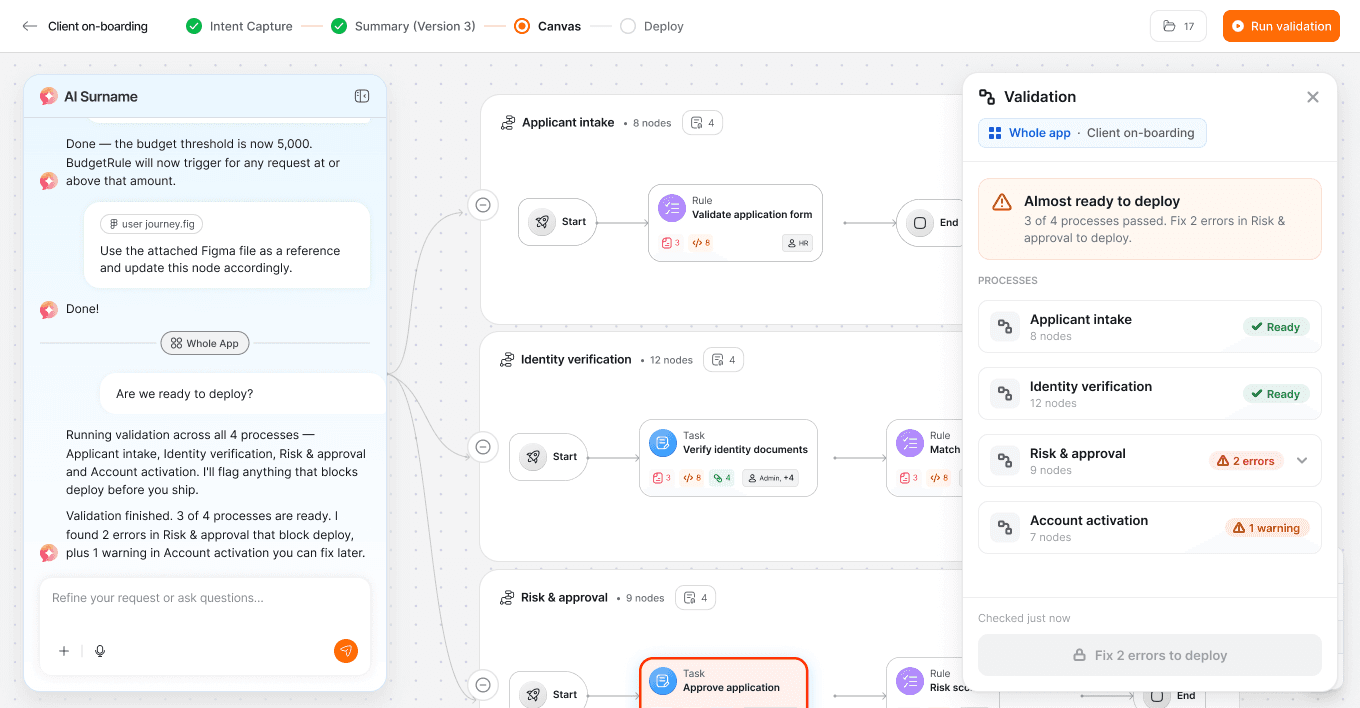
Validate
Errors block a release, warnings do not. Validation runs process by process, so the gate scales with the application instead of the other way round.

Deploy
A control panel rather than a celebration — live status, versioned change history, plain-language notes and non-destructive rollback.
VISUAL SYSTEM
A scalable visual guideline, built alongside the product.
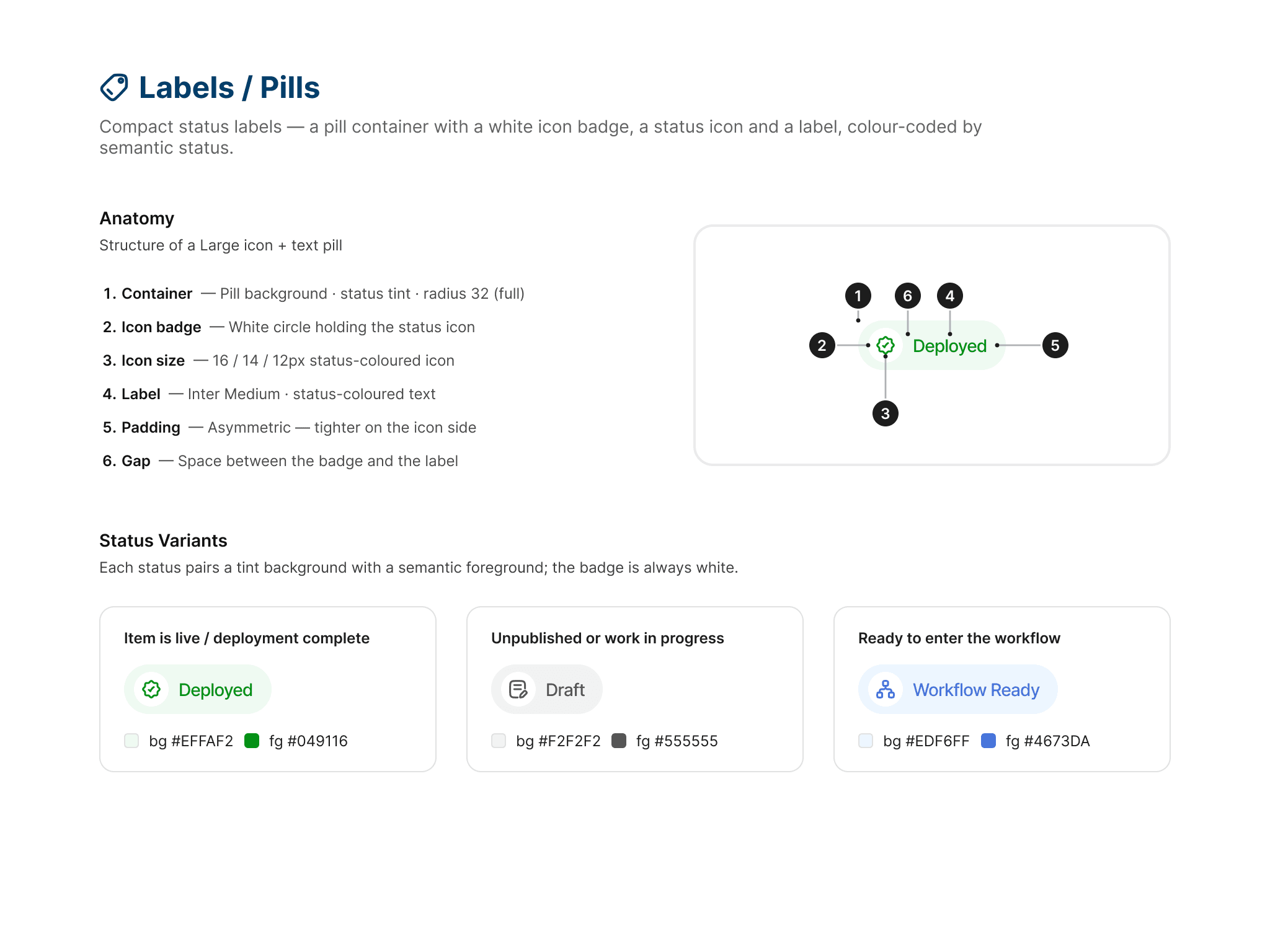
I created a visual guideline and component system so the product stayed consistent however much it generated — one type ramp and spacing scale, semantic colour that includes AI and change states, and shared button, form, card and flow-node components that hold up whether an application comes back with three processes or thirty.

GRID

TYPOGRAPHY
COLOUR

BUTTONS

ICONOGRAPHY
FLOW NODE LABELS

NODE CARD COLOUR

FORM CONTROLS
Phase 1 of the App Gen style guide — 34 boards covering grid, colour, type, components, flow nodes and conversation. The states carry the most weight: generating, changed and error mean the same thing on a node card, a form field and a project tile.
Multiple user interviews
We tested a clickable prototype of the whole flow with process owners and business analysts, round after round. Each round changed something: clarifying questions became skippable, the readable summary moved ahead of the canvas, editing anchored to a selected field, and the deploy gate started naming the work it was waiting on.


Clickable Prototype

OUTCOME
App Gen collapses an analyst-to-developer handoff chain into a single self-serve flow — without asking the organisation to change how it approves software.
A formal, downloadable BRD
AI output enters an approval process the organisation already runs.
Plain-language editing
Non-technical users correct generated schemas with no schema editor to learn.
Governed, reversible deploy
Releases are gated on validation and reversible through authored version history, inside the approvals and audit trail the platform already enforces.
MY CONTRIBUTION
I owned the design of App Gen’s core generation experience end to end — the four-stage model that structures the product, the patterns that make AI output reviewable (scope-anchored editing, visible change states, validation that separates blocking errors from warnings), and the visual system underneath it. I worked with product, engineering and the business team through phased implementation to keep the shipped product aligned with the intended experience.